


Website Redesign vs. Rebuild: How to Decide Without Wasting Your Budget
Website redesign vs rebuild is one of the most costly decisions a business can get wrong. Choosing a complete rebuild when a redesign would have solved the problem wastes thousands of rupees and weeks of downtime. Choosing a simple redesign when your site actually needs a rebuild means you’ll be back in the same position within months. Understanding the real difference helps you invest correctly the first time.
Why This Decision Gets Confused So Often
Many business owners approach an outdated website the same way regardless of what’s actually wrong with it. The website redesign vs rebuild decision depends entirely on whether the problem is visual and structural, or technical and foundational. According to Google’s Search Central guidelines on site migrations, how you approach structural changes to a website directly affects search rankings, making this decision even more important to get right.
What a Redesign Actually Fixes
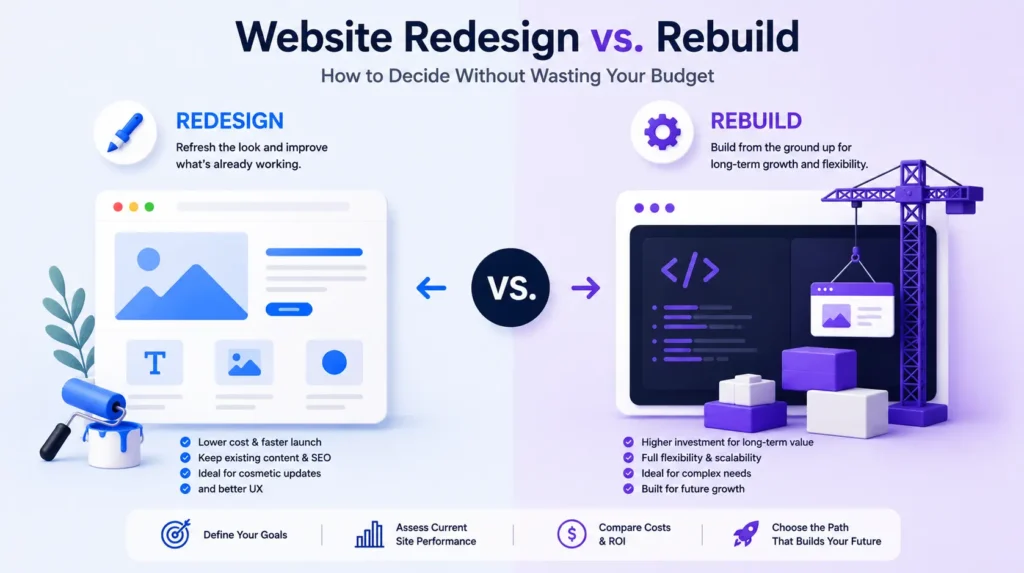
A redesign focuses on the visual layer — updated design, improved navigation, better mobile responsiveness, and refreshed branding — while keeping the underlying technical foundation largely intact. If your website functions well but looks outdated, loads reasonably fast, and has a stable technical structure, a redesign is usually the more cost-effective choice in the website redesign vs rebuild decision.
What a Rebuild Actually Solves
A rebuild involves reconstructing the site from the ground up, often including a new platform, database structure, or content management system. This is necessary when the underlying technology is outdated, insecure, or fundamentally incompatible with modern SEO and performance standards. If your site suffers from serious security vulnerabilities, extremely slow load times regardless of optimization, or a legacy platform no longer receiving updates, a rebuild is typically unavoidable.
Signs You Only Need a Redesign
Certain warning signs point clearly toward a redesign rather than a full rebuild. These include an outdated visual style that no longer reflects your brand, poor mobile responsiveness on an otherwise functional site, disorganized navigation that confuses visitors, and content that’s accurate but poorly presented. Businesses facing these issues can often solve them through a redesign without touching their underlying codebase.
Signs You Actually Need a Rebuild
More serious signs point toward a rebuild instead. These include a website built on a discontinued or unsupported platform, recurring security breaches or vulnerabilities, extremely slow performance that persists even after optimization attempts, and an inability to add necessary features due to outdated architecture. Ignoring these signs and opting for a surface-level redesign usually leads to the same problems resurfacing quickly.
Consider the SEO Impact Before Deciding
A rebuild carries far greater SEO risk than a redesign, since changes to URL structure, site architecture, or content management systems can affect how search engines crawl and rank your pages. Proper planning — including 301 redirects, XML sitemap updates, and careful migration testing — is essential to avoid losing organic traffic during a rebuild. A redesign, by contrast, typically carries minimal SEO risk since the underlying structure stays largely unchanged.
Budget Considerations for Each Option
Redesigns are generally significantly less expensive than rebuilds, since they focus on front-end changes rather than reconstructing backend systems. However, choosing a redesign when a rebuild is actually needed often leads to paying for the redesign now and the rebuild later, ultimately costing more than addressing the real problem from the start.
Timeline Differences Between Redesign and Rebuild
A redesign can typically be completed in a few weeks, since much of the technical foundation remains untouched. A rebuild often takes significantly longer, involving development, testing, content migration, and thorough quality assurance before launch. Businesses with time-sensitive needs should factor this difference heavily into their website redesign vs rebuild decision.
How to Get a Proper Assessment
Before committing to either option, a technical audit of your current website — covering platform stability, security, performance, and SEO health — provides clarity on which path actually addresses your specific problems. Tools like Google PageSpeed Insights and Google Search Console can reveal technical issues that indicate whether surface-level changes will be sufficient or whether deeper problems require a full rebuild.
Final Thoughts
The website redesign vs rebuild decision ultimately comes down to diagnosing the real problem rather than assuming the more dramatic option is always necessary. A proper technical assessment prevents costly mistakes in either direction — overspending on an unnecessary rebuild or underinvesting in a redesign that won’t solve underlying technical issues.
Not sure which your website needs? Explore our website development services for a professional assessment before you commit to either option.
Frequently Asked Questions
Q1. What is the main difference between Website Redesign vs Rebuild?
The biggest difference in Website Redesign vs Rebuild is that a redesign updates the look and user experience of your existing website, while a rebuild creates a completely new website with updated technology, structure, and functionality.
Q2. How do I choose between Website Redesign vs Rebuild?
When deciding between Website Redesign vs Rebuild, consider your website’s condition. If only the design feels outdated, a redesign may be enough. If your website has technical issues, slow performance, or security problems, a rebuild is often the better choice.
Q3. Is Website Redesign vs Rebuild better for SEO?
The answer depends on your website’s needs. Website Redesign vs Rebuild can both improve SEO when done correctly. A redesign enhances user experience, while a rebuild improves technical SEO, website speed, and Core Web Vitals.
Q4. Which costs more: Website Redesign vs Rebuild?
Comparing Website Redesign vs Rebuild, a rebuild generally costs more because it involves developing the website from scratch. A redesign is usually more affordable since it focuses mainly on updating the visual appearance.
Q5. How long does Website Redesign vs Rebuild usually take?
The timeline for Website Redesign vs Rebuild varies by project. A redesign often takes 2–6 weeks, while a complete rebuild can take anywhere from 6–16 weeks depending on the website’s complexity.
Q6. Can Website Redesign vs Rebuild affect my Google rankings?
Yes, Website Redesign vs Rebuild can impact SEO if not managed properly. Using proper redirects, preserving metadata, and testing before launch helps protect your search rankings.
Q7. When is Website Redesign vs Rebuild the right choice for my business?
Choosing Website Redesign vs Rebuild depends on your goals. Businesses looking for a modern appearance may benefit from a redesign, while those needing better performance and scalability should consider a rebuild.
Q8. Can Website Redesign vs Rebuild improve website speed?
Yes. Website Redesign vs Rebuild can both improve performance, but a rebuild usually delivers greater speed improvements by replacing outdated code and optimizing the website’s technical foundation.
Q9. Does Website Redesign vs Rebuild include mobile optimization?
Absolutely. Whether you choose Website Redesign vs Rebuild, your website should be fully responsive and optimized for mobile devices to improve user experience and SEO.
Q10. How can Tarun Marketing help with Website Redesign vs Rebuild?
Tarun Marketing evaluates your website before recommending Website Redesign vs Rebuild. We analyze design, performance, SEO, and business goals to suggest the most effective solution for long-term growth.
