

Build a Website That Works: Web Design & Development Explained
If you’ve ever wondered how a simple idea turns into a working website, you’re not alone. Most beginners hear the term web design and development and assume it’s one single skill. In reality, it’s two closely connected disciplines that come together to build a site people actually enjoy using. This guide breaks it down in plain language so you can understand the process, the tools, and the steps needed to build a website that works — even if you’ve never written a line of code. If you’re just getting started, our beginner’s guide to choosing a website platform is a good companion read.
What Is Web Design and Development?
Web design and development is the combined process of planning how a website looks and making it function on the internet. Design focuses on the visual side — layout, colors, fonts, and user experience. Development focuses on the technical side — coding, databases, and server logic that make the design actually work in a browser.
Think of it like building a house. The designer draws the blueprint and decides how each room should feel. The developer lays the foundation, wires the electricity, and makes sure the doors actually open. Neither role can succeed alone, which is why modern web design and development teams work so closely together.
This partnership matters more today than ever. Visitors form an opinion about a website within seconds of it loading, and that opinion is shaped by both what they see and how smoothly the page responds to their clicks. A beautiful layout that loads slowly will lose visitors just as quickly as a fast page that looks outdated or cluttered. That’s why the strongest websites treat design and development as one connected process rather than two separate jobs handled in isolation.
Why Understanding Web Design and Development Matters
Whether you’re a small business owner, a freelancer, or someone exploring a new career, learning the basics of web design and development gives you real advantages:
- You can communicate more clearly with designers and developers you hire.
- You can build a simple website yourself without waiting on anyone else.
- You understand why some sites load fast and rank well, while others don’t.
- You gain a valuable, in-demand skill set that opens up freelance and job opportunities.
A website is often the first impression a business makes. Poor web design and development choices — slow load times, confusing navigation, broken links — can drive visitors away in seconds. Good ones keep people engaged and encourage them to take action.
The Two Core Pillars
1. Web Design
Web design is about the user’s experience. It answers questions like: Where should the navigation menu go? What colors build trust? How do visitors move from the homepage to a purchase?
Key elements of web design include:
- Layout – how content is arranged on the page
- Typography – the fonts and text sizes used for readability
- Color scheme – colors that reflect the brand and guide attention
- Imagery – photos, icons, and graphics that support the message
- User experience (UX) – how intuitive and enjoyable the site feels to navigate
Popular design tools include Figma, Adobe XD, and Canva, which let designers create mockups before any code is written.
2. Web Development
Web development turns that design into a functioning site. It’s typically split into three areas:
- Front-end development – the part users interact with directly, built using HTML, CSS, and JavaScript
- Back-end development – the server, database, and application logic working behind the scenes, often using languages like Python, PHP, or Node.js
- Full-stack development – a combination of both front-end and back-end skills
Together, these layers of web design and development create a website that not only looks good but actually loads, responds, and stores data correctly.
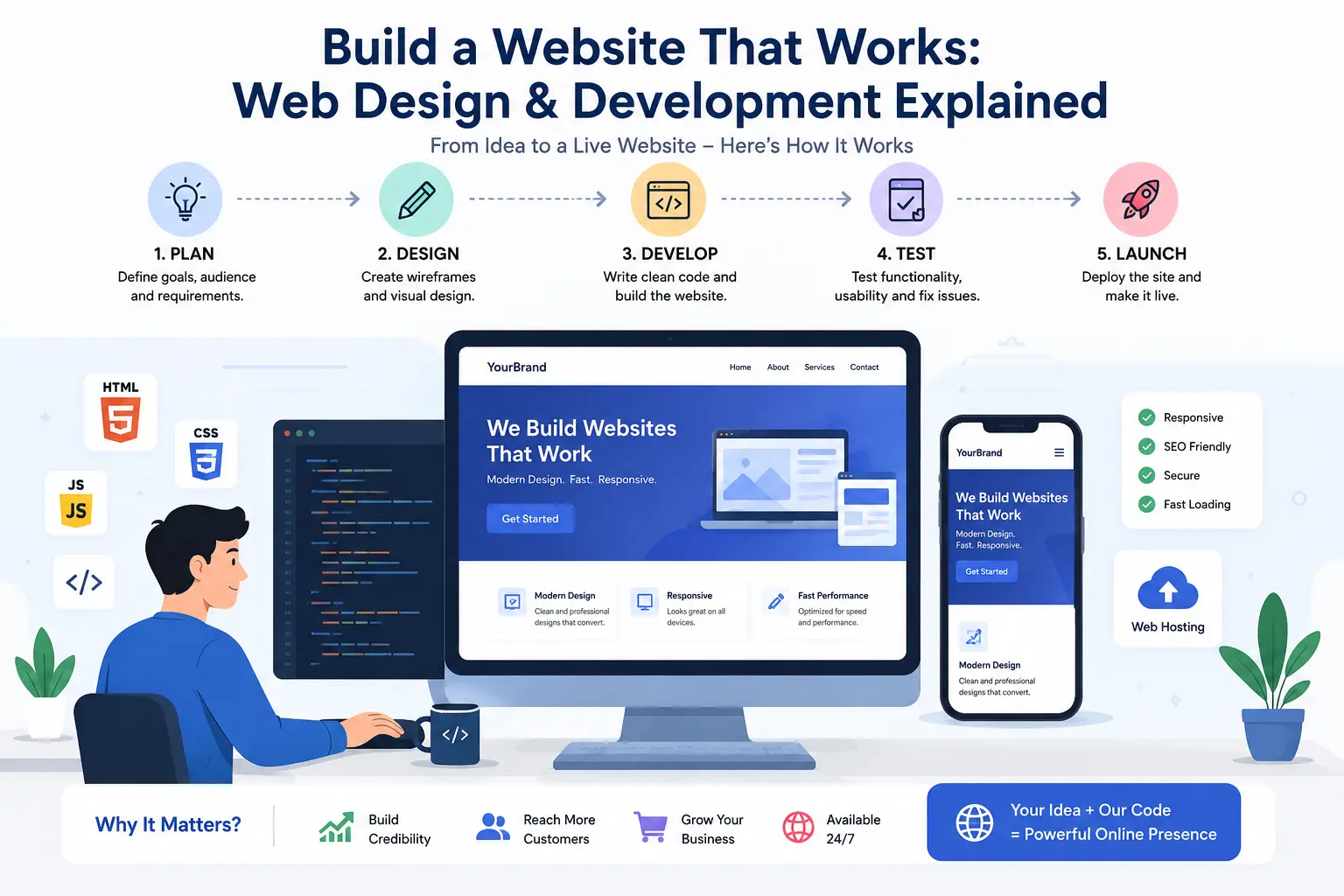
Step-by-Step: How to Build a Website That Works
Step 1: Define Your Goal
Before opening any tool, decide what your website needs to accomplish. A portfolio site, an online store, and a blog all require different structures and features. This clarity shapes every decision in your web design and development process.
Step 2: Plan the Structure
Sketch out a sitemap — a simple list of pages and how they connect. A basic business site might include a Home page, About page, Services page, and Contact page. Planning first saves you from restructuring later.
Step 3: Choose Your Approach
You have three common paths:
- Website builders (like Wix or Squarespace) – best for beginners who want speed and simplicity.
- Content management systems (like WordPress) – flexible and widely used, ideal for blogs and business sites.
- Custom coding – full control using HTML, CSS, JavaScript, and back-end frameworks, ideal for complex or unique projects.
Each path involves a different level of technical knowledge, so choose one that matches your skills and timeline. For a deeper comparison, see our website builders vs. WordPress breakdown.
Step 4: Design the Layout
Start with wireframes — simple sketches showing where elements go. Focus on clarity first, decoration second. A clean, easy-to-navigate layout almost always outperforms a flashy but confusing one.
Step 5: Build and Code
This is where development begins. If you’re coding by hand, start with HTML for structure, CSS for styling, and JavaScript for interactivity. If you’re using a builder or CMS, this step involves customizing templates and adding functionality through plugins or blocks.
Step 6: Optimize for SEO and Speed
A website that works isn’t just visually appealing — it needs to be found and load quickly. Basic optimization includes:
- Using descriptive page titles and headings
- Compressing images
- Writing clean, mobile-friendly code
- Ensuring fast server response times
Want to go deeper on this step? Check out our full website speed optimization guide.
These technical details are a core part of professional web design and development, since search engines reward sites that load fast and provide a good experience.
Step 7: Test Across Devices
Check how your site looks and behaves on desktops, tablets, and phones. Responsive design — where layouts adjust automatically to screen size — is no longer optional; it’s expected by users and required for good search rankings.
Step 8: Launch and Maintain
Once tested, your site goes live. But the work isn’t finished. Regular updates, security patches, and content refreshes keep a website running smoothly for years, not just months.
Common Mistakes Beginners Make
- Skipping the planning phase and jumping straight into design
- Overloading pages with too many fonts, colors, or animations
- Ignoring mobile users, who often make up the majority of traffic
- Forgetting about page speed, which affects both user experience and search visibility
- Neglecting accessibility, making sites hard to use for people with disabilities
Avoiding these mistakes early makes the whole process far smoother and saves significant time down the road.
Frequently Asked Questions
Do I need to know how to code to build a website? No. Website builders and content management systems let you create a functional site without writing code. Learning the basics of web design and development, however, gives you more control and flexibility as your needs grow.
How long does it take to build a website? A simple site built with a website builder can take a few days. A custom-coded project with unique features may take several weeks or months, depending on complexity.
What’s the difference between a web designer and a web developer? A web designer focuses on visual layout and user experience, while a web developer writes the code that makes the design function. Larger projects often need both roles working together.
Final Thoughts
Learning web design and development doesn’t require becoming an expert coder overnight. Start with the fundamentals — understand the difference between design and development, plan your site’s structure, choose the right tools for your skill level, and build with the user’s experience in mind. Every professional site you admire started with the same basic steps outlined here.
With patience and practice, you’ll move from simply using websites to actually building ones that work — for you, your business, or your future career.
